> For the complete documentation index, see [llms.txt](https://docs.meta-inf.hu/email-this-issue/llms.txt). Markdown versions of documentation pages are available by appending `.md` to page URLs; this page is available as [Markdown](https://docs.meta-inf.hu/email-this-issue/administration/email-this-issue-for-jira-cloud-oauth2-credentials/email-this-issue-for-jira-cloud-enabling-oauth2-authorization-in-your-microsoft-o365-account/microsoft-grant-flow.md).
# Microsoft Grant flow
## Setting permissions in Azure for Grant Flow
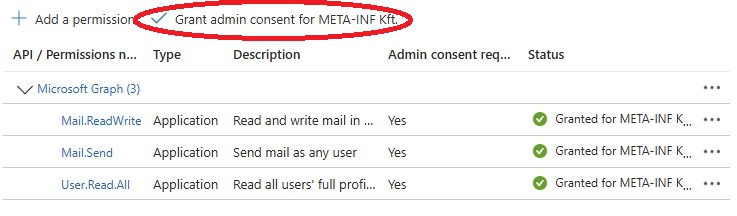
The following permissions are required for the Grant flow:
* Mail.ReadWrite
* Mail.Send
* User.Read.All
**Make sure to grant admin consent after adding permissions.**
## Credentials settings
The below image shows a setting for OAuth2 Credentials in Email This Issue. The Auth Endpoint URL ending has to be changed to `/adminconsent` .
After ensuring all data is given correctly, click the Authorization button and follow the steps. The authorization process should result in "Authorized successfully".
## Incoming and outgoing settings
When the OAuth Credential is authorized successfully, new Incoming and Outgoing Connections can be added. This way, the Connections themselves do not have to be authorized one by one.
{% hint style="warning" %}
If an existing, standard Connection with Connection mode: Microsoft Graph with OAuth2 should be changed to a Connection with Grant flow credential, please delete the Connection first and recreate it instead of just changing the OAuth2 Credentials.
{% endhint %}