# Custom Mail Server: Basic Authentication

We support both **IMAP** and **POP3** for incoming mail. However, for most users and modern workflows, we **strongly recommend using IMAP**. POP3 is provided only for legacy systems, as it lacks folder synchronization, multi-device support, and server-side state tracking, which are essential for a seamless email experience across devices.

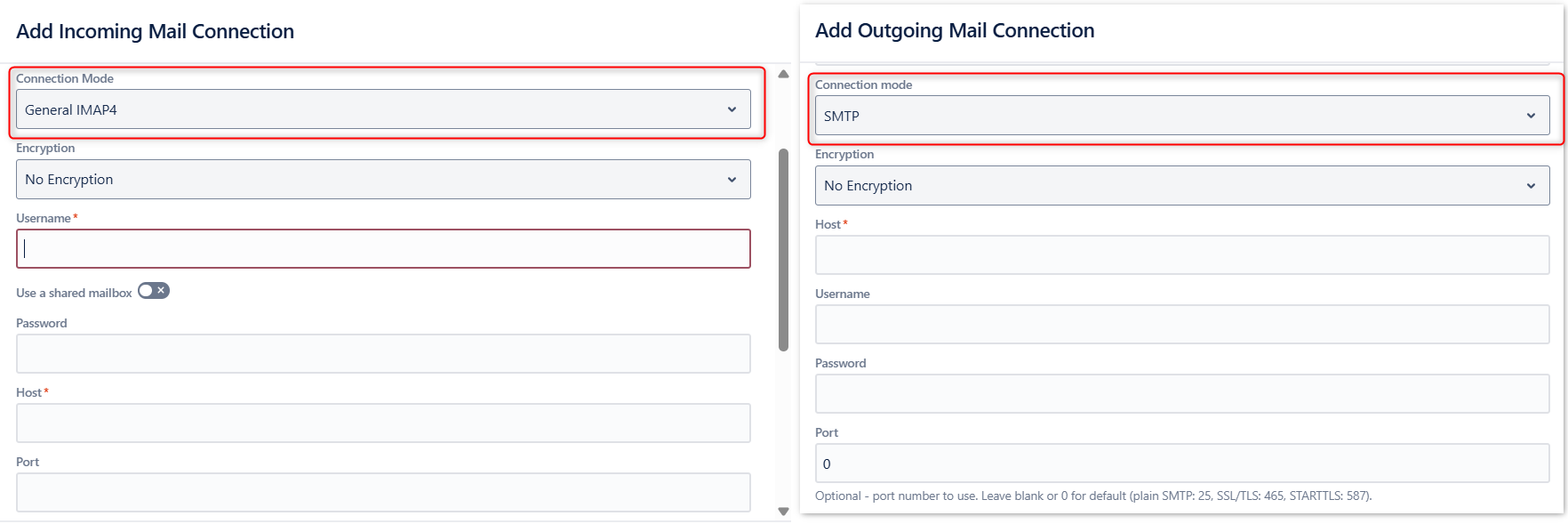
For an Outgoing mail connection to a custom mail server, select **SMTP**.

<figure><img src="https://880912854-files.gitbook.io/~/files/v0/b/gitbook-x-prod.appspot.com/o/spaces%2F-Mf8H-oTE_fhOrUtfYrN-2724419853%2Fuploads%2FKd2v1QmYyXCKqBN6HQ97%2Fimage.png?alt=media&#x26;token=0ce266fc-3022-4525-8603-12936c87abc7" alt="Incoming mail connection with IMAP, outgoing mail connection with SMTP protocol."><figcaption><p>Basic Authenticated incoming and outgoing connections</p></figcaption></figure>

<table><thead><tr><th width="249">Field</th><th>Value</th><th>Definition</th></tr></thead><tbody><tr><td>Encryption</td><td>No Encryption<br>SSL/TLS<br>STARTTLS</td><td>The preferred encryption method.</td></tr><tr><td>Username</td><td>Text field</td><td>The username you are authenticating with.</td></tr><tr><td>Password</td><td>Text field</td><td>Password for the above mentioned username</td></tr><tr><td>Use a shared mailbox</td><td>Toggle on to enter a shared mailbox alias</td><td>Use it in case the mailbox you want to access is shared with the username you are connecting with, but not the same mailbox.</td></tr><tr><td>Host</td><td>Text field</td><td>The host name of your mail server.</td></tr><tr><td>Port</td><td>Number field</td><td><p>The port you want the connection to be established through. Leave blank or 0 to use the default port for the connection type.<br><br>Defaults are: </p><ul><li>IMAP / IMAP with STARTTLS: 143</li><li>SSL/TLS IMAP: 993</li><li>POP3: 110</li><li>SSL/TLS POP3:995</li><li>SMTP: 25</li><li>SSL/TLS SMTP: 465SMTP with STARTTLS: 587</li></ul></td></tr></tbody></table>
